Parameters
Parameters define how MAINFRAME-B turns MIDI into light.
Organization
MAINFRAME-B’s settings are structured like this:
ZONE | PARAMETER | MODULATIONWithin PARAMETER, there are two views:
PRESET MENU | PARAMETER EDITEach zone has 8 presets and each preset has 10 parameters. The parameters are the same, but each preset stores its own values per zone.
Parameter Categories
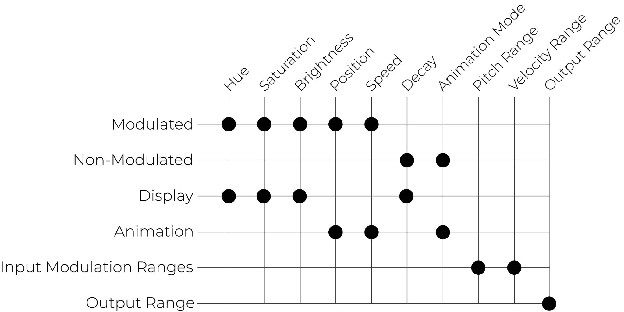
Modulated Parameters
These can be driven by pitch, velocity, or random modulation.
- Hue
- Saturation
- Brightness
- Position
- Speed
Non-modulated Parameters
These are changed only by the knob or MIDI CC.
- Decay
- Animation Mode
Display Parameters
These affect the LEDs’ color and brightness.
- Hue
- Saturation
- Brightness
- Decay
Animation Parameters
These affect how patterns move and render.
- Position
- Speed
- Animation Mode
Input Modulation Ranges
Sets the pitch/velocity ranges used for modulation within the current zone/preset.
- Pitch Range
- Velocity Range
Output Range
Limits where the zone renders on the strip so it stays within its assigned region.
Animation Modes
See the full mode descriptions in Animation Modes.
Modulation
For how modulation works and how to edit ranges and offsets, see Modulation.